Create a Pro Discord Banner in 60 Seconds
In this tutorial, we dive into Alphapil to create stunning, professional Discord banners in just 60 seconds. Whether you're a gamer, a developer, or just looking to spice up your profile, these customizable templates will give you the edge you need. We'll cover how to use simple commands to render dynamic text, images, and shapes into high-quality banners.
In this tutorial, we dive into Alphapil to create stunning, professional Discord banners in just 60 seconds. Whether you're a gamer, a developer, or just looking to spice up your profile, these customizable templates will give you the edge you need. We'll cover how to use simple commands to render dynamic text, images, and shapes into high-quality banners.
Getting Started
To get started with these templates, make sure you have Alphapil installed and set up. You can find the full documentation at the link below:
1. Level Card Template
The Level Card is a classic for Discord communities. It shows off the user's rank, level, and progress in a sleek, minimalist style.
The Code
# --- TEST DATA ---
$setVar[username;Sasuke Uchiha]
$setVar[avatar_url;https://path-to-your-image.png]
$setVar[level;42]
$setVar[rank;1]
$setVar[xp;750]
$setVar[next_xp;1000]

# --- LEVEL CARD SETUP ---
$createCanvas[505;259;#0d1117]
$loadFont[fonts/LeagueSpartan-Bold.ttf;bold]
$loadFont[fonts/LeagueSpartan-Regular.ttf;reg]

# --- BACKGROUND ---
$drawRect[0;0;505;259;#0d1117;none;#0d1117;0;0;lt]
# Abstract Background Elements
$drawCircle[505;0;180;#161b22;none;#161b22;0;mm]
$drawCircle[0;259;120;#161b22;none;#161b22;0;mm]

# --- AVATAR & RING ---
# Both use center point (105; middle) and mm anchor for perfect alignment
# Profile Ring (Outer)
$drawCircle[105;middle;75;none;#58a6ff;none;4;mm]
# Avatar (Inner) - Syntax: x;y;path;w;h;opacity;radius;circle;anchor
$drawImage[105;middle;{avatar_url};140;140;100;0;true;mm]

# --- USER IDENTITY ---
$drawText[205;85;$toUpper[{username}];white;34;bold;anchor=lm;truncate_width=270]
$drawText[205;125;LEVEL {level};#58a6ff;22;bold;anchor=lm]

# --- RANK (TOP RIGHT) ---
$drawText[465;55;RANK #{rank};white;24;bold;anchor=rm]

# --- PROGRESS BAR ---
$setVar[max_w;260]
# Width = (xp / next_xp) * max_w
$setVar[progress_w;$math[{xp}/{next_xp}*{max_w}]]

# Background Bar
# Syntax: x;y;w;h;color;outline;fill;outline_width;radius;anchor
$drawRect[205;165;{max_w};18;#21262d;none;#21262d;0;9;lt]
# Actual Progress Bar
$drawRect[205;165;{progress_w};18;#58a6ff;none;#58a6ff;0;9;lt]

# XP Details
$drawText[465;200;{xp} / {next_xp} XP;#8b949e;15;reg;anchor=rm]
$save[level-card.png]
The Result

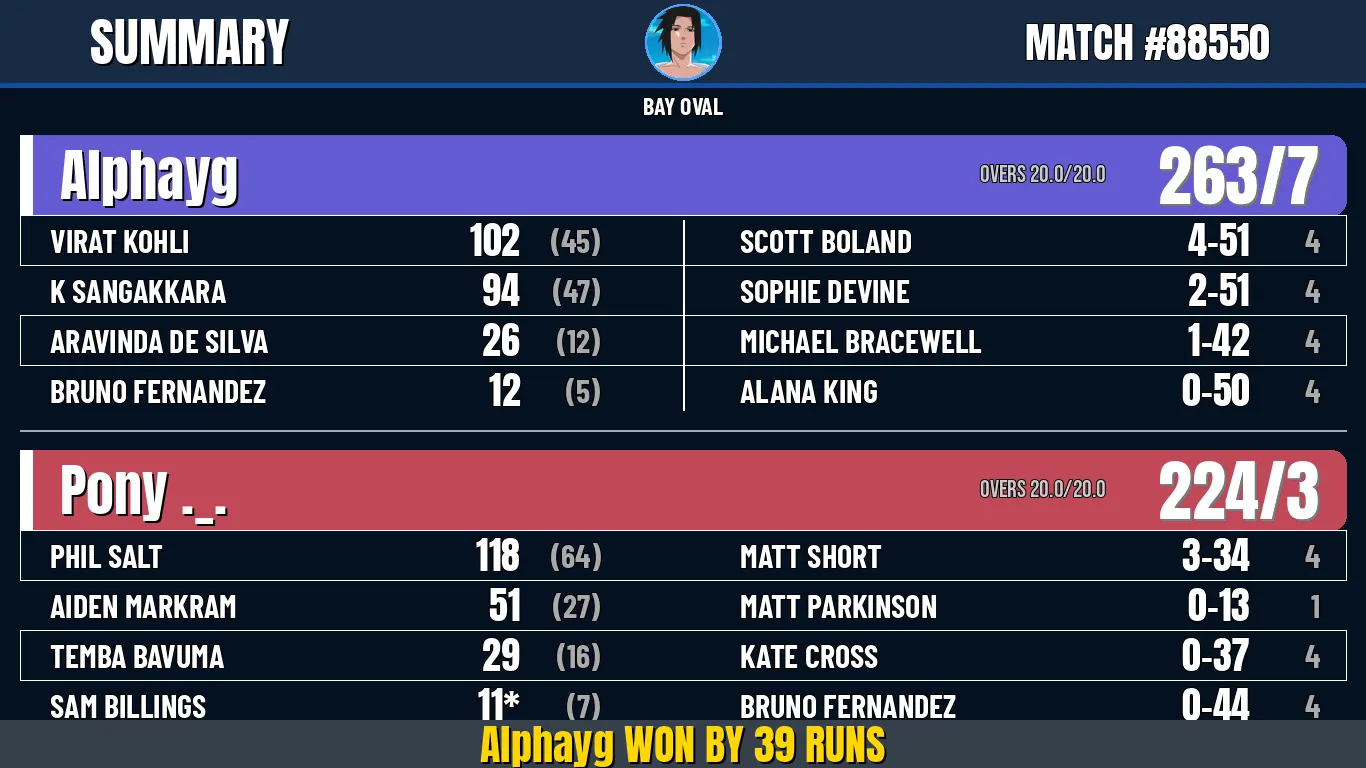
2. Cricket Scoreboard Template
Perfect for sports enthusiasts, this template provides a detailed breakdown of a cricket match, including team scores and individual player stats.
The Code
# --- SETUP ---
$createCanvas[1366;768;#041225]
$loadFont[https://github.com/google/fonts/raw/main/ofl/bebasneue/BebasNeue-Regular.ttf;bebas]
$loadFont[https://github.com/google/fonts/raw/main/ofl/anton/Anton-Regular.ttf;anton]
$loadFont[https://github.com/google/fonts/raw/main/ofl/barlowcondensed/BarlowCondensed-Bold.ttf;barlow]

# --- BACKGROUND & HEADER ---
$drawRect[0;0;1366;768;#031122;none;#031122;0;0;lt]
$drawRect[0;0;1366;85;#061b37ee;none;#061b37ee;0;0;lt]
$drawLine[0;85;1366;85;#0f4ea3;5]

$drawText[90;42;SUMMARY;white;52;anton;lm;0;none;#000000;2,2]
$drawText[1270;42;MATCH #88550;white;42;anton;rm]

$drawCircle[683;42;38;#0e3a72;#4aa3ff;#0e3a72;3;mm]
$drawImage[683;42;https://path-to-your-image.png;72;72;100;;true;mm]
$drawText[683;105;BAY OVAL;white;24;barlow;mm]

# --- TEAM 1: Alphayg ---
# Removed white outline to fix "white mark" issue
$drawRoundedRect[20;135;1326;80;15;#3d33c7cc;none;#3d33c7cc;0;lt]
$drawRect[20;135;12;80;#FFFFFF;none;#FFFFFF;0;0;lt]

$drawText[60;175;Alphayg;white;56;anton;lm;0;none;#000000;2,2]
$drawText[980;175;OVERS 20.0/20.0;#CCCCCC;24;bebas;lm]
$drawText[1320;175;263/7;white;68;anton;rm;0;none;#00000088;2,2]

# Row 1: Striped
$drawRect[20;215;1326;50;#FFFFFF08;none;none;0;0;lt]
$drawText[50;240;VIRAT KOHLI;white;32;barlow;lm]
$drawText[520;240;102;white;38;anton;rm]
$drawText[600;240;(45);#AAAAAA;32;barlow;rm]

# Row 2: Plain
$drawText[50;290;K SANGAKKARA;white;32;barlow;lm]
$drawText[520;290;94;white;38;anton;rm]
$drawText[600;290;(47);#AAAAAA;32;barlow;rm]

# Row 3: Striped
$drawRect[20;315;1326;50;#FFFFFF08;none;none;0;0;lt]
$drawText[50;340;ARAVINDA DE SILVA;white;32;barlow;lm]
$drawText[520;340;26;white;38;anton;rm]
$drawText[600;340;(12);#AAAAAA;32;barlow;rm]

# Row 4: Plain
$drawText[50;390;BRUNO FERNANDEZ;white;32;barlow;lm]
$drawText[520;390;12;white;38;anton;rm]
$drawText[600;390;(5);#AAAAAA;32;barlow;rm]

# Bowlers Column 1
$drawText[740;240;SCOTT BOLAND;white;32;barlow;lm]
$drawText[1250;240;4-51;white;38;anton;rm]
$drawText[1320;240;4;#AAAAAA;32;barlow;rm]

$drawText[740;290;SOPHIE DEVINE;white;32;barlow;lm]
$drawText[1250;290;2-51;white;38;anton;rm]
$drawText[1320;290;4;#AAAAAA;32;barlow;rm]

$drawText[740;340;MICHAEL BRACEWELL;white;32;barlow;lm]
$drawText[1250;340;1-42;white;38;anton;rm]
$drawText[1320;340;4;#AAAAAA;32;barlow;rm]

$drawText[740;390;ALANA KING;white;32;barlow;lm]
$drawText[1250;390;0-50;white;38;anton;rm]
$drawText[1320;390;4;#AAAAAA;32;barlow;rm]

$drawLine[683;220;683;410;#FFFFFF22;2]
$drawLine[20;430;1346;430;#0c2f6366;2]

# --- TEAM 2: Pony ._. ---
$drawRoundedRect[20;450;1326;80;15;#b11b2ecc;none;#b11b2ecc;0;lt]
$drawRect[20;450;12;80;#FFFFFF;none;#FFFFFF;0;0;lt]

$drawText[60;490;Pony ._.;white;56;anton;lm;0;none;#000000;2,2]
$drawText[980;490;OVERS 20.0/20.0;#CCCCCC;24;bebas;lm]
$drawText[1320;490;224/3;white;68;anton;rm;0;none;#00000088;2,2]

# Row 1: Striped
$drawRect[20;530;1326;50;#FFFFFF08;none;none;0;0;lt]
$drawText[50;555;PHIL SALT;white;32;barlow;lm]
$drawText[520;555;118;white;38;anton;rm]
$drawText[600;555;(64);#AAAAAA;32;barlow;rm]

# Row 2: Plain
$drawText[50;605;AIDEN MARKRAM;white;32;barlow;lm]
$drawText[520;605;51;white;38;anton;rm]
$drawText[600;605;(27);#AAAAAA;32;barlow;rm]

# Row 3: Striped
$drawRect[20;630;1326;50;#FFFFFF08;none;none;0;0;lt]
$drawText[50;655;TEMBA BAVUMA;white;32;barlow;lm]
$drawText[520;655;29;white;38;anton;rm]
$drawText[600;655;(16);#AAAAAA;32;barlow;rm]

# Row 4: Plain
$drawText[50;705;SAM BILLINGS;white;32;barlow;lm]
$drawText[520;705;11*;white;38;anton;rm]
$drawText[600;705;(7);#AAAAAA;32;barlow;rm]

# Bowlers Column 2
$drawText[740;555;MATT SHORT;white;32;barlow;lm]
$drawText[1250;555;3-34;white;38;anton;rm]
$drawText[1320;555;4;#AAAAAA;32;barlow;rm]

$drawText[740;605;MATT PARKINSON;white;32;barlow;lm]
$drawText[1250;605;0-13;white;38;anton;rm]
$drawText[1320;605;1;#AAAAAA;32;barlow;rm]

$drawText[740;655;KATE CROSS;white;32;barlow;lm]
$drawText[1250;655;0-37;white;38;anton;rm]
$drawText[1320;655;4;#AAAAAA;32;barlow;rm]

$drawText[740;705;BRUNO FERNANDEZ;white;32;barlow;lm]
$drawText[1250;705;0-44;white;38;anton;rm]
$drawText[1320;705;4;#AAAAAA;32;barlow;rm]

# --- FOOTER ---
$drawRect[0;720;1366;48;#02101fcc;none;#02101fcc;0;0;lt]
$drawText[center;744;Alphayg WON BY 39 RUNS;gold;42;anton;mm;0;none;#000000;2,2]
$save[cricket.png]
The Result
3. Soccer Match Template
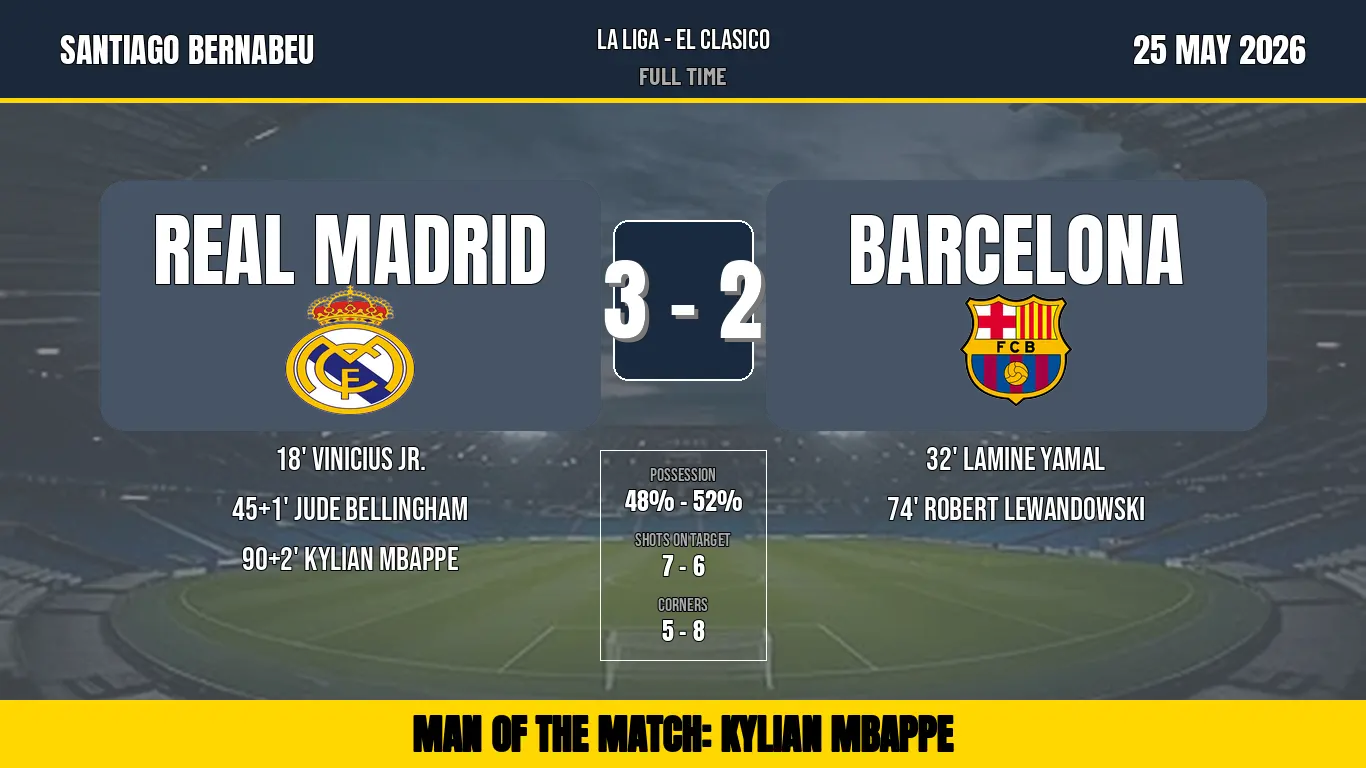
Bring the excitement of El Clásico to your Discord profile with this professional soccer match scoreboard.
The Code
# --- SETUP ---
$createCanvas[1366;768;#050f1a]
$loadFont[https://github.com/google/fonts/raw/main/ofl/bebasneue/BebasNeue-Regular.ttf;bebas]
$loadFont[https://github.com/google/fonts/raw/main/ofl/anton/Anton-Regular.ttf;anton]
$loadFont[https://github.com/google/fonts/raw/main/ofl/barlowcondensed/BarlowCondensed-Bold.ttf;barlow]

# --- BACKGROUND & ATMOSPHERE ---
# Base background
$drawRect[0;0;1366;768;#050f1a;none;#050f1a;0;0;lt]
# Stadium Background Image with 40% opacity
$drawImage[0;0;https://path-to-your-stadium.png;1366;768;40;;;lt]

# Subtle top-bar
$drawRect[0;0;1366;100;#0a1a2eee;none;#0a1a2eee;0;0;lt]
$drawLine[0;100;1366;100;#FFD700;5] # Gold accent line

# --- HEADER INFO ---
$drawText[center;40;LA LIGA - EL CLASICO;white;28;bebas;mm]
$drawText[center;75;FULL TIME;#AAAAAA;24;barlow;mm]
$drawText[60;50;SANTIAGO BERNABEU;white;34;anton;lm]
$drawText[1306;50;25 MAY 2026;white;34;anton;rm]

# --- THE SCOREBOARD AREA ---
$drawRoundedRect[100;180;500;250;25;#1a2a3fcc;none;#1a2a3fcc;0;lt]
$drawRoundedRect[766;180;500;250;25;#1a2a3fcc;none;#1a2a3fcc;0;lt]

# Team Names
$drawText[350;250;REAL MADRID;white;80;anton;mm]
$drawText[1016;250;BARCELONA;white;80;anton;mm]

# Team Logos
$drawImage[350;350;https://path-to-logo1.png;130;130;100;;;mm]
$drawImage[1016;350;https://path-to-logo2.png;130;130;100;;;mm]

# --- THE BIG SCORE ---
$drawRoundedRect[613;220;140;160;15;#1a2a3f;white;#1a2a3f;2;lt]
$drawText[683;300;3 - 2;white;90;anton;mm;0;none;#00000088;4,4]

# --- GOAL SCORERS ---
# Note: Fixed quote bug in package now allows "Time' Player Name" to render in white.
# Real Madrid
$drawText[350;460;18' VINICIUS JR.;white;32;bebas;mm]
$drawText[350;510;45+1' JUDE BELLINGHAM;white;32;bebas;mm]
$drawText[350;560;90+2' KYLIAN MBAPPE;white;32;bebas;mm]

# Barcelona
$drawText[1016;460;32' LAMINE YAMAL;white;32;bebas;mm]
$drawText[1016;510;74' ROBERT LEWANDOWSKI;white;32;bebas;mm]

# --- MATCH STATS ---
$drawRect[600;450;166;210;#FFFFFF08;none;none;0;0;lt]
$drawText[683;475;POSSESSION;#AAAAAA;18;bebas;mm]
$drawText[683;500;48% - 52%;white;24;anton;mm]
$drawText[683;540;SHOTS ON TARGET;#AAAAAA;18;bebas;mm]
$drawText[683;565;7 - 6;white;24;anton;mm]
$drawText[683;605;CORNERS;#AAAAAA;18;bebas;mm]
$drawText[683;630;5 - 8;white;24;anton;mm]

# --- FOOTER ---
$drawRect[0;700;1366;68;#FFD700;none;#FFD700;0;0;lt]
$drawText[center;734;MAN OF THE MATCH: KYLIAN MBAPPE;black;40;anton;mm]
$save[soccer.png]
The Result
Check out the full documentation to learn how to create your own: meralabs.dev/alphapil/docs